Installation and setup
open·kritt runs locally with Docker Compose. The repository includes ./kritt, an
interactive CLI that creates the environment file, guides model access setup, and starts
the stack. It does not need an npm install step.
Prerequisites
- Docker Desktop, or Docker Engine with the Docker Compose plugin
- Git
- Node.js 20 or newer for the repository-local CLI
The manual Docker path does not use host Node.js. This is useful on distributions whose default package repository still provides Node 16 or 18.
Tested Linux matrix
The full source build, five long-running services (plus the one-shot runner-image helper), and scan startup have been exercised on each of these Linux combinations:
| Distribution | x86_64 | ARM64 | Startup paths checked |
|---|---|---|---|
| Ubuntu 24.04 | Yes | Yes | ./kritt start, manual Compose |
| Debian 12 | Yes | Yes | manual Compose, development overlay |
| Rocky Linux 9 | Yes | Yes | ./kritt start, manual Compose with SELinux Enforcing |
Docker Desktop remains the normal macOS/Windows development path, but it was not part of that Linux cloud matrix. Images are built for the host architecture; no amd64 emulation is required on the tested ARM64 hosts.
Install Node.js 20+
Check the version before running the CLI:
node --version
On Ubuntu 24.04 or Debian 12, the distribution default may be older than Node 20. One repeatable option is the NodeSource 22.x repository:
sudo apt-get update
sudo apt-get install -y ca-certificates curl
curl -fsSL https://deb.nodesource.com/setup_22.x | sudo -E bash -
sudo apt-get install -y nodejs
node --version
On Rocky Linux 9, select a current AppStream rather than installing its default stream:
sudo dnf module reset -y nodejs
sudo dnf module enable -y nodejs:20
sudo dnf install -y nodejs
node --version
If your distribution does not offer a suitable stream, use a Node version manager or skip the CLI and follow Manual Docker setup.
On Linux, verify Docker access before setup. Both commands must succeed as your regular user:
docker info >/dev/null
docker compose version
If Docker requires sudo, configure non-root Docker access
or use rootless Docker before running
the open·kritt CLI.
Install and launch
Clone the repository
git clone https://github.com/Kritt-ai/open-kritt && cd open-krittOpen the CLI
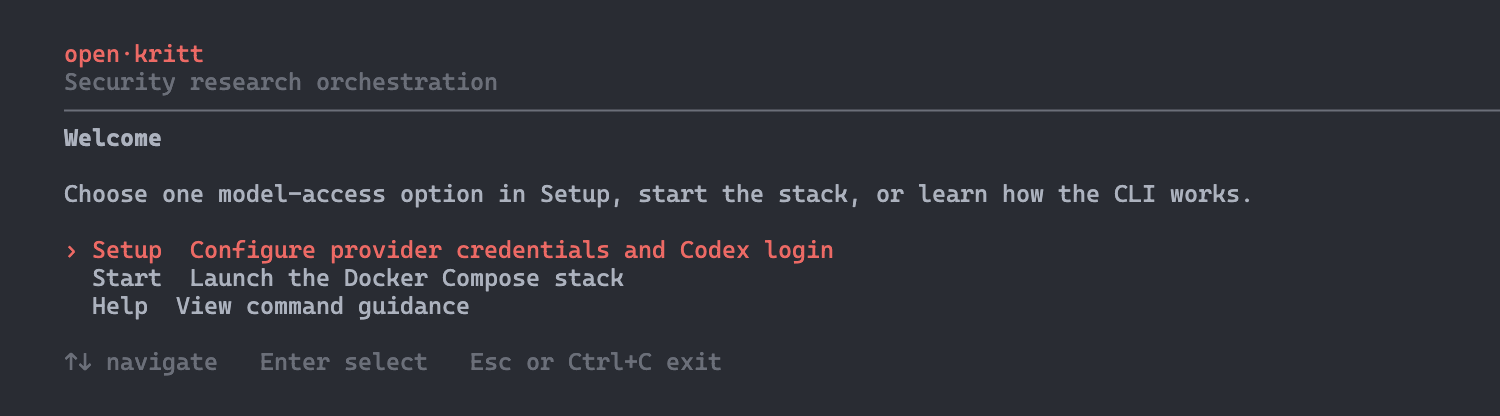
./krittUse the Arrow keys to select Setup, press Enter, and follow the prompts. The CLI creates
.envfrom.env.examplewhen it does not exist.Configure model access
Choose one model-access method. The recommended path is the guided Codex login; a provider API key works too. Follow the AI provider setup guides for account, key, billing, and verification steps. A GitHub token is optional and only needed for private GitHub repositories.
Start open·kritt
Choose Start in the menu, or run:
./kritt startThe command runs
docker compose up --buildand stays attached to the stack. Press Ctrl+C to stop it.
After startup, open http://localhost:5173. The backend health endpoint is available at http://localhost:3002/api/health.
Configure model access
You need one of the following options to create scans:
| Option | When to use it |
|---|---|
| Codex login (recommended) | Use eligible ChatGPT/Codex subscription access through the guided device flow. |
OPENAI_API_KEY | Use an OpenAI Platform API key with the Codex harness. |
CODEX_API_KEY | Use the same kind of OpenAI Platform key as a direct Codex execution override. |
ANTHROPIC_API_KEY | Use Claude Code with Anthropic API billing. |
OPENROUTER_API_KEY | Route a compatible model through OpenRouter. |
GITHUB_TOKEN is separate from model access. Add it only when the scan needs to clone a
private GitHub repository or dependency.
The setup screen shows which options are present, lets you set, replace, unset, or learn about them, and never prints credential values.
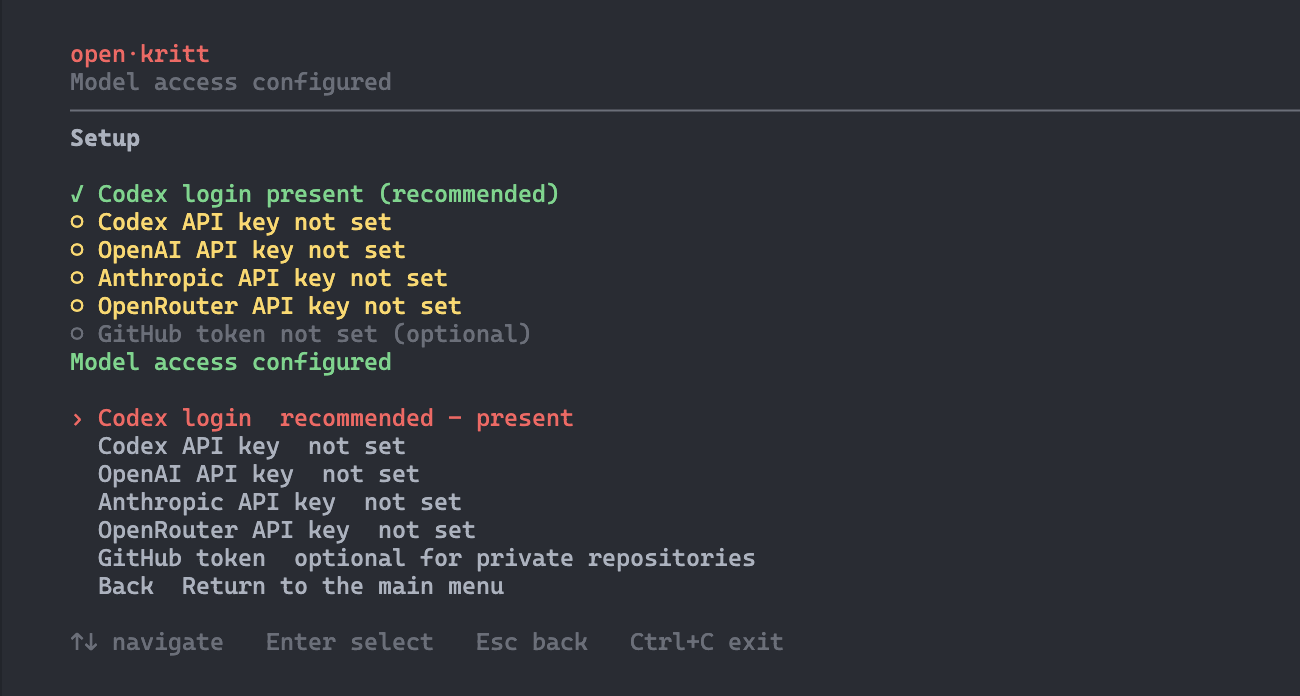
For detailed instructions, choose the Codex, Claude Code, or OpenRouter guide. The guides explain where to obtain the credential, how it is billed, which harness it enables, and how to verify it.
CLI commands
| Command | Purpose |
|---|---|
./kritt | Open the full-screen interactive menu. Arrow keys navigate, Enter selects, and Esc or Ctrl+C exits. |
./kritt setup | Create .env when needed and configure model access or the optional GitHub token. |
./kritt start | Check setup, then run docker compose up --build. Ctrl+C stops the attached stack. |
./kritt help | Show command guidance. Use ./kritt help setup or ./kritt help start for a specific command. |
Manual Docker setup
The CLI is the recommended path. To configure the stack manually with an API key instead:
cp .env.example .env
chmod 600 .env
# Set one provider credential in .env: OPENAI_API_KEY, CODEX_API_KEY,
# ANTHROPIC_API_KEY, or OPENROUTER_API_KEY.
mkdir -p .data/codex
chmod 700 .data/codex
docker compose up --build
Optional demo data
Once the stack is running, load sample workflows, scans, and findings to explore the UI:
docker compose exec backend npm run seed
The demo seed is additive and idempotent. It preserves existing workflows, scans, findings, post-scripts, and triage data, and skips demo records that already exist.
Next: review AI provider setup, then build your first workflow.