Add and use skills
An agent skill is a reusable block of Markdown instructions you can attach to a scan. Skills are installed into the executor agent and complement the workflow prompt with focused guidance - for example, how to review a particular language or class of bug.
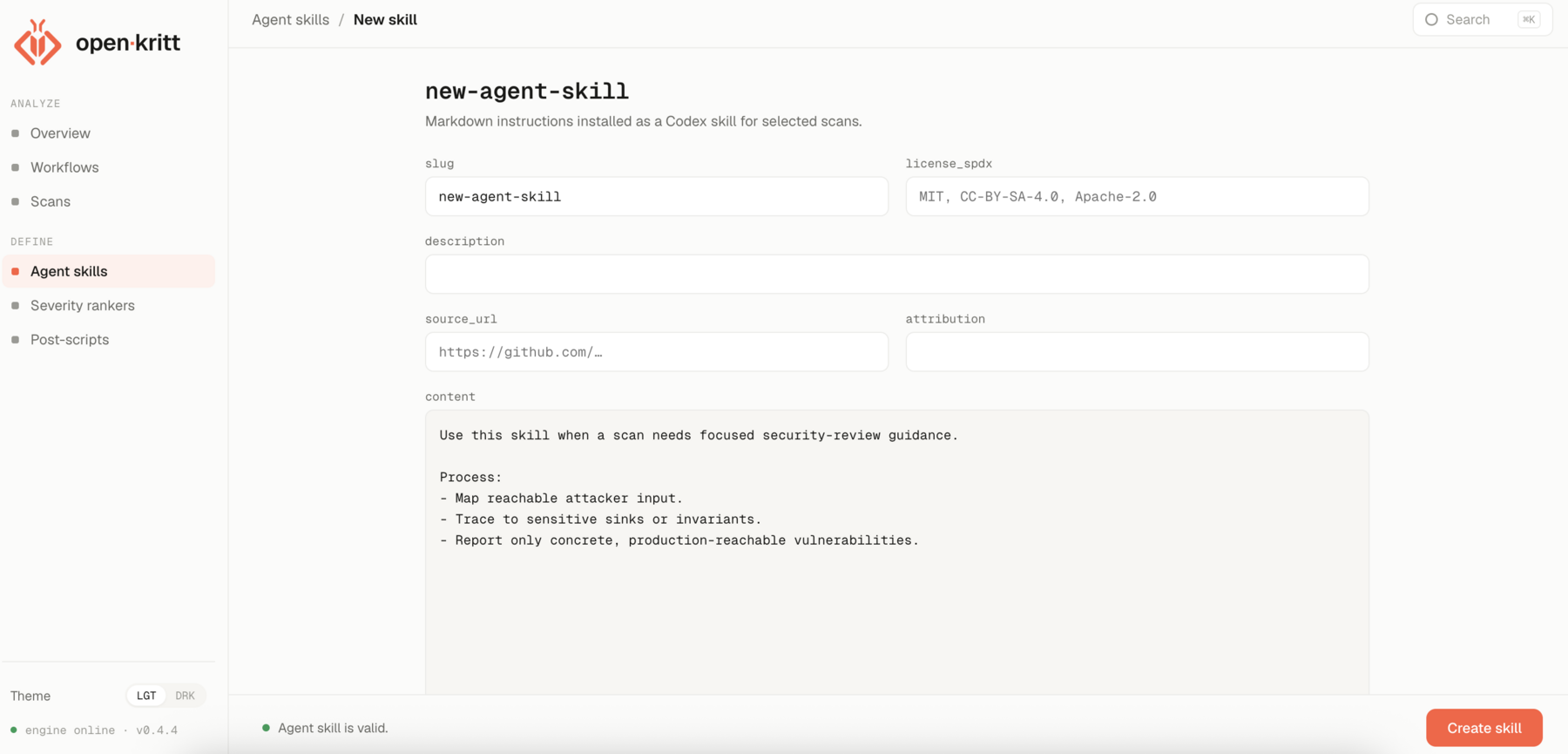
Create a skill
Open Agent skills → New skill and fill in:
| Field | Purpose |
|---|---|
slug | A URL-safe unique identifier (auto-generated from the name). |
name | Human-readable name. |
description | Short summary of what the skill is for. |
content | The Markdown instructions the agent follows. |
source_url | Optional link to where the skill came from. |
license_spdx | Optional SPDX license id for attribution. |
attribution | Optional credit line. |
The content is the heart of it - clear, reusable guidance, for example:
Use this skill when a scan needs focused security-review guidance.

Process:
- Map reachable attacker input.
- Trace to sensitive sinks or invariants.
- Report only concrete, production-reachable vulnerabilities.
Use skills on a scan
Select any number of skills when you create a scan. The selected skills are installed into each executor agent for that scan and injected into the prompt as a labelled section, so the agent applies them alongside the workflow's own instructions.
The metadata fields (source_url, license_spdx, attribution) travel with the skill so
you can keep proper credit when a skill is adapted from someone else's work.
Next: create a scan.