Create a scan
A scan is one run of a workflow against a target. It bundles the target, the model and harness, and the skills, post-scripts, and rankers you want applied, then the engine queues it and runs every step.
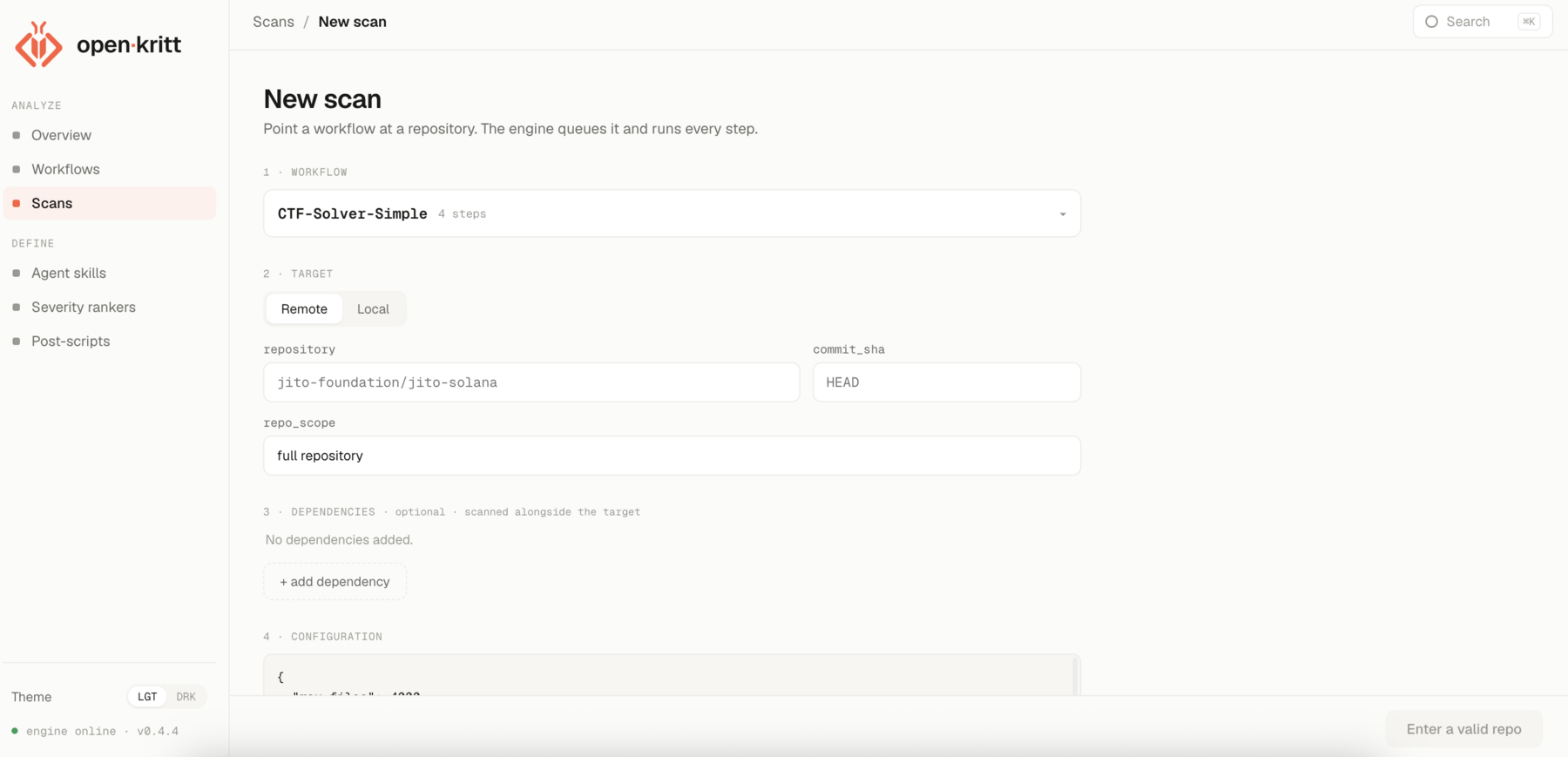
The form
Open Scans → New scan and fill in each section:
Workflow
The blueprint to run. Its steps execute in depth order.
Target
A remote or local repository, an optional
commit_sha, and arepo_scopedescribing what to focus on.Dependencies
Optional dependency repos checked out alongside the target.
Configuration
A JSON configuration blob the agents can read.
Extra
Values for any
extrakeys the workflow requires.Model and harness
The model, provider, harness, and thinking effort to run with.
Skills, post-scripts, rankers
Attach skills, post-scripts, and rankers for this run.
HTTP API
The UI is the guided creation path. Automation can queue the same scan with
POST /api/scans; ./kritt configures and starts the stack but does not have a scan
subcommand.
Obtain workflow, post-script, skill, and ranker content from their list endpoints first:
curl --fail http://127.0.0.1:3002/api/workflows
curl --fail http://127.0.0.1:3002/api/post-scripts
curl --fail http://127.0.0.1:3002/api/agent-skills
curl --fail http://127.0.0.1:3002/api/severity-rankers
The create body accepts these fields:
| Field | Required | Shape and behavior |
|---|---|---|
workflowId | Yes | Existing workflow ID. |
postScriptId | Yes | Existing primary post-script ID. Put additional IDs in configuration.post_script_ids. |
agentSkillIds | No | Array of existing numeric skill IDs. |
repo_kind | No | remote (default) or local. |
repo_full | Yes | GitHub owner/repo/URL for remote; one immediate folder name under /local_repos for local. |
commit_sha | Remote only | Commit, tag, or branch to check out; defaults to HEAD. Local snapshots ignore it. |
repo_scope | No | Focus description exposed as {{repo_scope}}; defaults to full repository. |
dependencies | No | Array of { "kind", "repo_full", "commit_sha"? } references. |
configuration | No | JSON object exposed as {{configuration}}; repeat_runs and additional post-script IDs also live here. |
model | Yes | Provider model ID or supported alias. |
model_provider | Yes | codex, claude, or openrouter. |
harness | Yes | Supported values are codex and claude-code; it must be compatible with the provider. |
thinking_effort | No | Model/harness-specific: default, low, medium, high, xhigh, max, or ultra; defaults to medium. |
severity_ranker | Yes | Non-empty combined Markdown ranking rules, not a ranker ID. |
extra | As required by workflow | Object containing every {{extra.<key>}} referenced by the selected workflow. Unknown keys are discarded. |
Provider/harness combinations are codex + codex, claude + claude-code, and
openrouter + claude-code or advanced codex. The API returns 422
with field-specific errors when IDs, required workflow extras, local folders, configured
providers, models, or combinations are invalid.
Remote scan example
Replace the IDs and model with values available in your installation. This example pins the target commit, adds a remote dependency, attaches a skill and two post-scripts, and uses OpenRouter through Claude Code:
curl --fail-with-body \
  -X POST http://127.0.0.1:3002/api/scans \
  -H 'Content-Type: application/json' \
  --data-binary @- <<'JSON'
{
  "workflowId": 1,
  "postScriptId": 1,
  "agentSkillIds": [1],
  "repo_kind": "remote",
  "repo_full": "octocat/Hello-World",
  "commit_sha": "7fd1a60b01f91b314f59955a4e4d4e80d8edf11d",
  "repo_scope": "authentication and untrusted input paths",
  "dependencies": [
    {
      "kind": "remote",
      "repo_full": "octocat/Spoon-Knife",
      "commit_sha": "HEAD"
    }
  ],
  "configuration": {
    "repeat_runs": 1,
    "post_script_ids": [1, 2]
  },
  "model": "z-ai/glm-5.2",
  "model_provider": "openrouter",
  "harness": "claude-code",
  "thinking_effort": "low",
  "severity_ranker": "Rank exploitable, remotely reachable findings first.",
  "extra": {}
}
JSON
Local scan example
Create the host folder before submitting. With the default Compose mapping,
./local_repos/qa-smoke-target on the host appears as /local_repos/qa-smoke-target in
the backend and engine. The request contains only the immediate folder name, not either
absolute path:
mkdir -p ./local_repos/qa-smoke-target
# Add the source files to ./local_repos/qa-smoke-target, then:

curl --fail-with-body \
  -X POST http://127.0.0.1:3002/api/scans \
  -H 'Content-Type: application/json' \
  --data-binary @- <<'JSON'
{
  "workflowId": 1,
  "postScriptId": 1,
  "repo_kind": "local",
  "repo_full": "qa-smoke-target",
  "repo_scope": "full repository",
  "dependencies": [],
  "configuration": {},
  "model": "sonnet",
  "model_provider": "claude",
  "harness": "claude-code",
  "thinking_effort": "medium",
  "severity_ranker": "Rank exploitable findings first.",
  "extra": {}
}
JSON
Local source contents, including modified and untracked files, are copied into a fixed scan snapshot. Review them for secrets before queueing the request.
Lifecycle
Once submitted, a scan moves through a series of statuses:
pending → prewarming_cache (optional) → running → post_processing → completed
prewarming_cache may be skipped when no cache preparation is needed. An active scan can
move to paused; stopped and failed are terminal until an operator resumes them. The
scan detail page shows live status, active jobs, and errors as they happen.
The following pages break down each part of the form.