Prompt editor and prompt output
Each step has two halves in the builder: the prompt content you write, and the output schema the agent must fill.
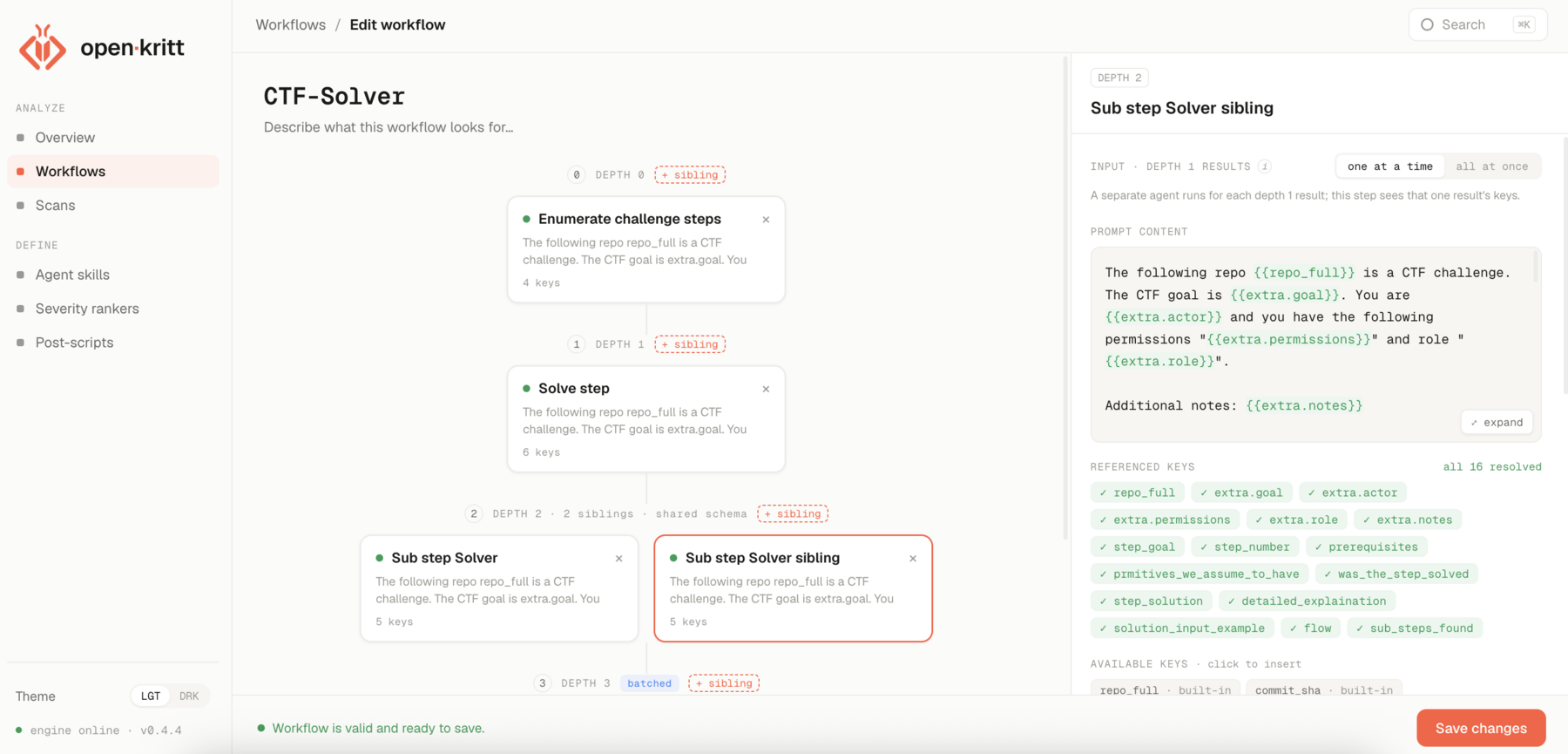
The prompt editor
The content field is your prompt. As you type, the editor highlights every
{{variable}} token and validates it live:
- Referenced keys turn green when they resolve (a built-in, an
extrakey, or a key emitted by an earlier depth) and red when they don't. - Available keys are listed for you - click one to insert it at the cursor.
This makes it hard to ship a prompt that references a variable that will never exist at run time.
Prompt output
There is no separate free-text "output" field. Instead, each step declares an output format: the keys it emits and their types. At run time the engine wraps your prompt with instructions to return JSON matching that schema.
That JSON is the step's output. It's stored and then merged into the context for the next depth, so downstream prompts can reference those keys directly.
Chaining steps
Because each step's output keys become available variables downstream, workflows chain naturally: depth 0 enumerates targets, depth 1 reads one target's keys and digs in, and the terminal step emits the finding schema.
Next: prompt variables.